Type one line. Get Figma design tokens.

Claude Code skills that write real variables and text styles into your Figma file. Free and open source.

Get startedGitHub

>Purple:#5C3FC4
  1. 950
  2. 900
  3. 800
  4. 700
  5. 600
  6. 500
  7. 400
  8. 300
  9. 200
  10. 100
  11. 50

11 variables written to Brand/Purple

How it works

  1. Install the skills

    Download the project once. The Guide shows how.

  2. Type a short line

    Like Purple:#5C3FC4 or Spacing. That is the whole request.

  3. Watch Figma fill up

    Real variables and text styles land in your open file.

Twelve skills, one system

Every one of them, interactive. Try them below.

figma-color-scale

One color in. Eleven steps out.

Give it a name and a hex. You get a full 950-to-50 scale in Brand, the same numbers you would get from the opacity trick by hand, minus the afternoon.

Purple:#5C3FC4

Live demo. The same math the skill uses.

Purple:#5C3FC4

  1. Purple/950#090614
  2. Purple/900#120D27
  3. Purple/800#25194E
  4. Purple/700#372676
  5. Purple/600#4A329D
  6. Purple/500 Default#5C3FC4
  7. Purple/400#7D65D0
  8. Purple/300#9D8CDC
  9. Purple/200#BEB2E7
  10. Purple/100#DED9F3
  11. Purple/50#EFECF9

figma-alias-bridge

Roles that follow your colors

Primary, Neutral, Error and friends are links into Brand, not copies. Swap the brand color later and every role updates with it.

Brand/Purple -> Alias/Primary (Purple)

Scripted preview.

Brand/Purple -> Alias/Primary (Purple)

  • Brand/Purple/950Alias/Primary/950
  • Brand/Purple/700Alias/Primary/700
  • Brand/Purple/500Alias/Primary/500
  • Brand/Purple/300Alias/Primary/300
  • Brand/Purple/50Alias/Primary/50

Each Alias variable is a reference, never a copied hex. Change the brand color and every role follows.

figma-mapped-roles

Light and Dark, already decided

Surface, Border, Text and Icon variables, each pointing at an Alias step. Dark mode mirrors Light, with exceptions where mirroring would fail contrast.

Mapped dark

Values from the skill preset, with Purple as Primary and Gray as Neutral.

Design tokens, applied

Body text uses Text/body. The link uses Text/action.

Get startedSelected
VariableLightDark
Surface/pageNeutral/50Neutral/950
Surface/defaultWhiteNeutral/900
Surface/actionPrimary/500Primary/500
Surface/action-secondaryPrimary/50Primary/800
Text/headingNeutral/900Neutral/100
Text/bodyNeutral/700Neutral/300
Text/actionPrimary/500Primary/200
Text/on-actionWhiteWhite
Border/secondaryNeutral/200Neutral/700

figma-spacing

Spacing that sticks to the grid

A fixed scale in 4px units. Spacing/4 is 16px, every time, in every file.

Spacing

Default scale, subset shown.

  • Spacing/14px
  • Spacing/28px
  • Spacing/312px
  • Spacing/416px
  • Spacing/624px
  • Spacing/832px
  • Spacing/1248px
  • Spacing/1664px
  • Spacing/2496px

figma-type-scale

Type that flexes between Desktop and Mobile

Font variables, a size scale with a Desktop and a Mobile mode, and text styles bound to both. One command, no spreadsheet.

Typography

Default settings: base 16, ratio 1.25 Desktop and 1.2 Mobile.

  • Display/Default76 / 9256 / 68Design tokens
  • Heading/H160 / 7248 / 56Design tokens
  • Heading/H248 / 5640 / 48Design tokens
  • Heading/H340 / 4832 / 40Design tokens
  • Body/Default16 / 2016 / 20Design tokens
  • Caption/Default12 / 1612 / 16Design tokens

figma-radius · figma-border-width

Corners and borders, on a scale

Border radius from square to a full pill, and four border weights, all in 4px units. Pick one of each and watch the same card, button and avatar follow.

Border radius

Interactive. The values are the two skills’ fixed scales.

Border radius

Border width

Input

Border radius/2 = 8px

Border width/0-5 = 2px

The card is capped at 28px so full stays readable.

figma-motion

Timing and easing you can feel

Durations from 250ms to 2500ms and four easing curves, stored as Figma’s own timing and easing variables.

Motion

Interactive. The durations and curves are the skill’s presets.

Motion/Duration/Default = 1000ms
Motion/Easing/Standard = cubic-bezier(0.2, 0, 0, 1)

figma-contrast-fix

Fix the colors that fail

Finds Mapped pairs below WCAG AA and previews a passing step from the same role. Nothing changes until you ask to apply.

Contrast fix

Live demo of the rule, for one pair.

CurrentText/action
Preview fixText/action

Simplified to one pair. The skill checks every Mapped pair, on every surface it sits on. Preview changes nothing; Apply is a separate request.

figma-export-tokens

Tokens as code

CSS custom properties, W3C design tokens JSON and a Tailwind v4 theme, with references kept as references.

Export tokens

A trimmed sample of the skill’s real output.

Export tokens

:root {  /* Brand */  --brand-plum-500: #3b1a53;  --brand-spacing-4: 16px;  --brand-motion-duration-default: 1000ms;  /* Alias */  --alias-primary-500: var(--brand-plum-500);  /* Mapped */  --mapped-surface-page: var(--alias-primary-500);}/* Dark mode: set data-theme="dark" on a parent, or follow the system setting. */:root[data-theme="dark"] {  --mapped-surface-page: #0b0b0d;}
{  "alias": {    "primary": {      "500": {        "$type": "color",        "$value": "{brand.plum.500}"      }    }  }}
@theme inline {  /* Alias colors */  --color-primary-500: var(--alias-primary-500);  /* Mapped colors */  --color-surface-page: var(--mapped-surface-page);  /* spacing */  --spacing-4: var(--brand-spacing-4);}

A trimmed sample of the skill's real output. References stay references, and the files are generated, so rebuild instead of editing.

figma-starter

The whole system from one line

Give it one to four brand colors and a font pair. It runs every skill above in order, and a dry run shows the plan first.

/figma-starter Plum:#3B1A53 ...

Scripted preview of the run order.

/figma-starter Plum:#3B1A53 Periwinkle:#8E7FAE heading "Moneta Sans" body Lato

  1. figma-color-scalePlum:#3B1A53, Periwinkle:#8E7FAE, then -default
  2. figma-alias-bridgePrimary, Secondary, then -default roles
  3. figma-mapped-rolesMapped, then Mapped dark
  4. figma-spacingSpacing
  5. figma-radiusBorder radius
  6. figma-border-widthBorder width
  7. figma-motionMotion
  8. figma-type-scaleTypography heading "Moneta Sans" body Lato
  9. figma-token-docsDesign Tokens

Runs the other skills in order. Steps that already exist are skipped.

figma-token-docs

A page that documents it all

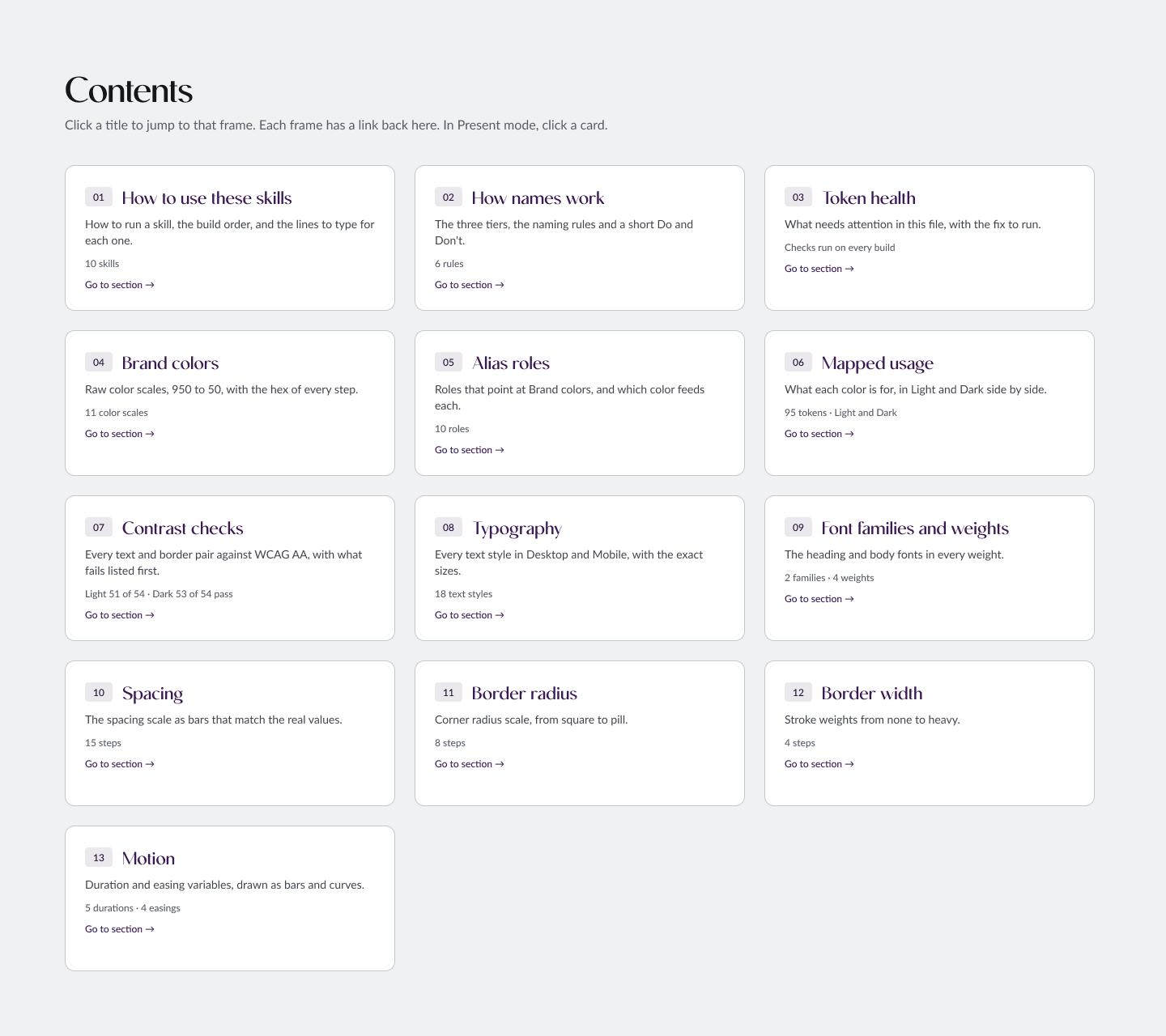
One frame per section, generated from your live variables. Rerun it after a change and the page refreshes.

Design Tokens

A real screenshot of the Contents frame.

The Contents frame of the Design Tokens page in Figma: a card for each section of the system

Why designers like it

  • Faster setup

    A whole system in minutes, not days.

  • Consistent naming

    The same names in every file you start.

  • Structure that scales

    Brand, Alias and Mapped keep changes in one place.

  • No code required

    You type short lines. Claude does the scripting.

  • Free and open source

    MIT licensed. Use it, change it, share it.

Who it is for

Designers who want design tokens fast, so they can move on to components and patterns.

  • No scripting

    The variables are written to Figma for you. You never write code.

  • No Git or GitHub

    Download the skills once and use them. No repositories or commands to learn.

  • Just Claude Code and Figma

    A Claude Code account and Figma are all it takes to run the skills.

Questions

Do I need Claude Code?

Yes. The skills run inside Claude Code and write to your Figma file through the Figma Console MCP.

Do I need GitHub?

No account needed. You download the project once, and the Guide walks you through it in plain steps.

Will it overwrite my existing variables?

It writes to the Brand, Alias, Mapped and Responsive collections. A variable with the same name has its value updated in place, and hand-tuned Mapped values are kept unless you ask for a reset. Add dry run to any line to see what would happen first.

Is it free?

Yes. It is open source under the MIT license, including for commercial work.

Build your system in one line

Get startedGitHub